Grab your timer - this shouldn’t take longer than 10 minutes! ⏲
Yep, 10 minutes.
Grab a timer and try it.
In order for this to work in under 10 min, you do need to have a legal residence in the EEA and Switzerland. If you don't you probably have different options in your own country 😉.
We'll be opening a separate bank account through your phone, from which you can easily control and manage expenses.
Ready? Leeeeeeet’s go!
1. Know your income
Hopefully you have a pretty good estimate of how much you make every month. Whether you're a student receiving support through your parents or maintenance loan, or a young professional just getting started on their career. Add up your income and keep it in mind.
We’re going to be following the story of Annie, who saw this post and is now challenging me to set up her budget in under 10 minutes. Go Annie.
She does some quick thinking and breaks down her income into:
- Day job: £1,500/month
- Side hustle teaching English: £200/month
From this she determines that her total monthly income is £1,800/month.
2. Download REVOLUT
No I am not affiliated to them (although this link will give you a free £5 🤓). Revolut is a FREE online bank that offers you a separate bank account as well as an in-built budgeting feature. It’s free, easy to use and looks nice. For benefits of using digital banks check out this post.
So take out your phone, go to the Google Play store or App store and download Revolut. For more details on how Revolut works and why it's safe, scroll down to the bottom 😉.
Annie has a snazzy Samsung. She hops onto Google Play and downloads Revolut. ‘That wasn’t too hard.’, she thinks.
3. Verify your identity
Once Revolut is downloaded, you will need to go through a quick verification process. You need to put in your phone number, create a passcode, enter the code you receive and enter personal details: name, date of birth, address and email. And voila, your account has been created!
You will then need to prove that you really are the person who you say you are - this is a bank account after all. You’ll see you’ll still be able to do transactions and stuff without verifying your identity, but it’s good to get it done asap.
Go to More (3 dots at bottom right) > Profile > Personal details > Verify Identity > take pic of passport, driver’s license or ID > take a selfie. Et voila!

One of the huge benefits of opening a bank account with Revolut is you don’t need to use a proof of residence, which is a huge headache for students or people who share flats.
The verification process takes about 10 minutes (which I’m not including in my own 10 minutes) and bam; - you have a separate bank account that only exists on your phone. Pretty sweet huh?
If you’re wondering ‘Wow I’m giving all my personal details to this app – is it secure?’ I assure you these apps cannot sell your details and it’s all encrypted and anonymous, and Revolut has a banking license and therefore up to £85,000 of your money is protected by the FCS. For more details check out their FAQ.
Annie goes ahead and verifies her account. The app is loading, telling her that in a few (precious) minutes she will have her very own bank account. Annie is excited.
4. Set & track your budget
It’s crazy how easy Revolut makes budgeting. Now you’ve got a separate bank account for daily and monthly expenses - food, going out, rent, etc. You won’t get charged any commissions, a good exchange rate abroad and you’ll get notified every time you spend money. Oh, and you can easily split bills, send and request money and even buy crypto! As you can see I’m a bit of a fan 😍.
You’ve probably used up 5 minutes of your time now, and the next 5 minutes are the real nitty gritty of the setting your budget. But trust me, it’s just as easy.
Before spending anything you’ll need to request the debit card that does cost £5 (ouchie - although if you use this link you get a free £10 😉). But before even spending anything and, I want you to actually set up your budget.
I’m going to use my Euro bank account as an example.
Go back to the ‘More (3 dots)’ at the bottom and click on Vaults. Then click on ‘Add new vaults’. This vault will be your monthly savings.

Annie opens up a new vault and calls it ‘Monthly savings’ (not very creative are we Annie?). Her goal is to save £5,000 for her first cash cushion. She doesn’t want to use the Spare change functionality so she turns it off. The vault has been created, but then it asks her how much she would like to put aside every day/week/month.

Following the 15% rule, 15% of £1,800 is £270. So she wants to set aside £100 to her cash cushion and £170 to investments every month. The sets the payment to be sent every month, on the exact same date she receives her salary.
And that’s it. With a few clicks, Annie has set up an automatic transfer from her salary to her savings. She doesn’t even have to worry about saving now. Awesome.
Next is the actual budget.
Go to ‘Analytics’ on the bottom menu and click on the ‘EUR Budget’ or 'GBP Budget' button

It then asks you ‘What’s your monthly budget?’ and then you have the option to turn on ‘Budgeting categories’. This is where the true magic happens.
Annie puts in 1,800€ as her total monthly budget, and then fills out the categories accordingly.
Let’s follow what Annie does. She goes through every category and sets the budgets:
Remember, so far she has 1,800 - 270 = 1,530 left
So she sets it accordingly:
Groceries: £200
Shopping: £100
Restaurants: £50
Transport: £100
Travel: £200
Entertainment (books, gym, etc): £70
Utilities (including rent): £700
Which gives a nice total of £1,300. She has an extra £100 if something comes up.
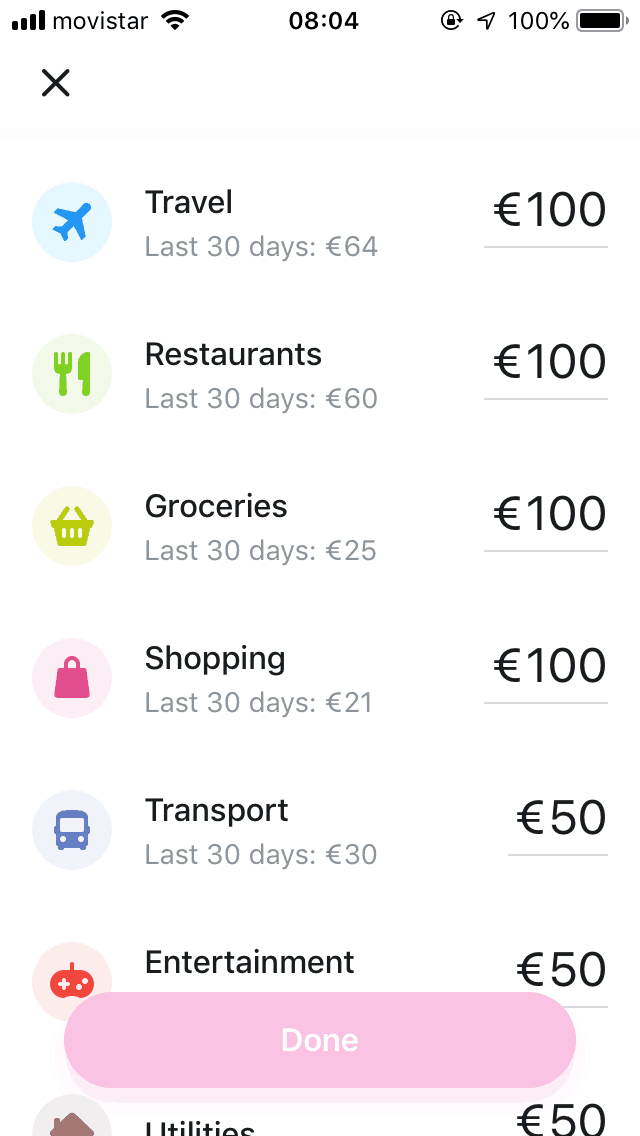
Of course, every person will have different categories and different amounts, but remember that if this is your first time budgeting, this is an estimate. At the end of the month you may realise ‘I need to allocate more to Transport and less to Entertainment’ – and that’s totally fine. A bit part about budgeting is constantly adjusting.
If you feel you can save more than 15% then please go ahead. 15% is a good number to get started with as it’s easy, not much pressure and you can still see some difference.
Make sure it all adds up to your income and BAM, you have set up your budget.
5. Adjust and stay on track
Your 10 minutes are probably up by now, but the budgeting is DONE. Congrats, you have just set up a budget! Easy peasy right?
Now the important thing to make sure is that Revolut allocates your expenses into the right categories. So every now and then, enter the app, check the expenses that have been processed and make sure they’re in the right category.
You can do this by going to Accounts > "an expense" > clicking on the category above the icon > changing category.
I love how easy it is to see all your expenses nice and clearly. You can quickly see how much you have left you have to spend on that category for the month, and can adjust accordingly. Pure genius.
Annie has set up her budgets on Revolut and is has now ordered her debit card which will arrive in the post. Once it arrives, she will transfer her monthly earnings to the app and start putting her budget into practice. Now she can go out into the world knowing her expenses are tracked, her budgets are set, and she is in control of her money. Yes Annie!
It’s a shame traditional banks do not have amazing features like Revolut in their app, if not things would be a lot easier! Yes, you’ll have to transfer your salary to the Revolut app every time you receive it (or ask to change bank account number with your company, but that’s up to you), but once that’s done the rest is automatic.
And you can play a lot with stuff like Vaults - set a goal for an emergency fund, for a big trip, for investments, for the next big thing. It’s pure freedom and flexibility, and it feels pretty great.
And my favourite part is the notifications that Revolut sends me - amazing:

Woohoo! Were you able to complete it in 10 minutes? For even more info on budgeting check out these snazzy articles:


